
Invoicing
Generate invoices directly from your completed tasks; hours, rates, services, and descriptions are already there. Customize your template, send via email, and accept online payments via Stripe. Automated reminders handle the follow-up.

Invoicing built-in and integrated. Time to dump your separate app.
One-Click Generation
Select completed tasks and generate a professional invoice instantly—no manual data entry
Online Payments
Accept credit card payments via Stripe directly from your invoices
Email Delivery
Send invoices directly via email with a professional client-facing view
Custom Templates
Drag-and-drop invoice editor with your logo, colors, and custom fields
Automated Reminders
Set up automatic late payment reminders so you never have to chase clients
PDF Export
Download invoices as professionally formatted PDFs for your records
How Invoicing Works in hr/glass
Create Basic Invoice
Start with choosing a Client and then a Project. Select which Tasks to bill.
Generate Invoice Direct from Project
One click creates a professional invoice with all task details pre-filled.
Customize & Send
Add notes, adjust formatting, and send via email to your client.
Get Paid
Client pays online via Stripe. Payment is recorded automatically.


Full and Partial Invoicing Directly from Projects
Single-click any Project to start the billing process
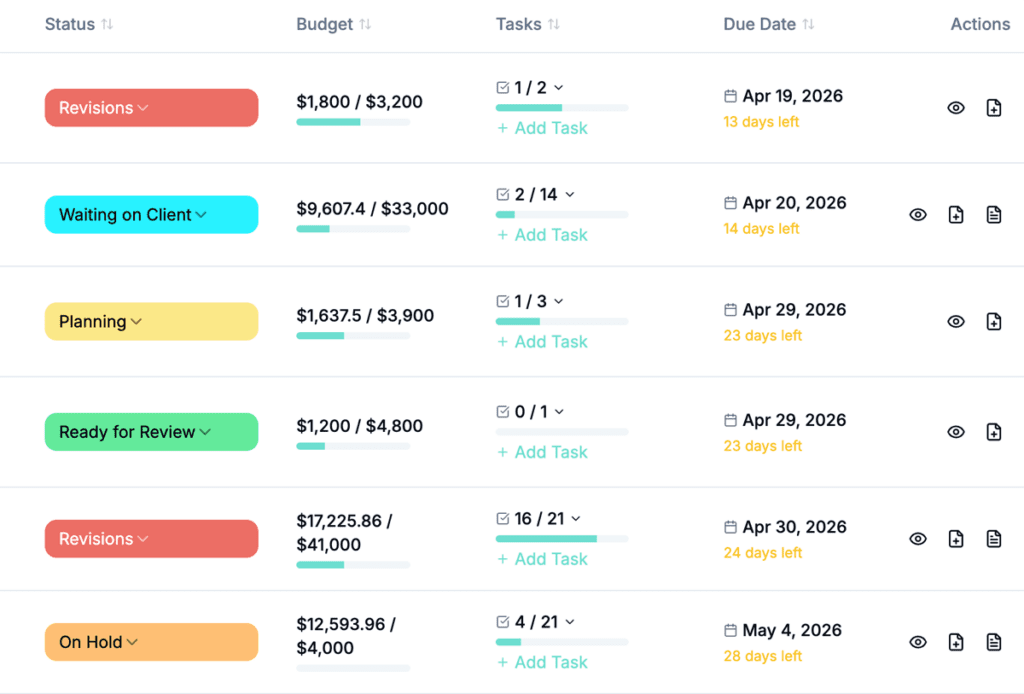

Generating Invoices is beyond simple.
Clear, intuitive visual progress indicators show exactly where each project stands at every stage. Easily generate invoices directly from completed projects or bill for partially completed work with just a click; eliminating manual data entry and reducing the risk of errors.
Video Tutorial /Create Invoices and Get Paid Online
How to create Invoices from Projects and Tasks and get paid via Stripe and PayPal
Who would use hr/glass for Invoicing?
Freelancers
Send professional invoices in minutes instead of hours and get paid faster with online payments
Agencies
Generate invoices for multiple projects and clients with consistent branding and automated follow-up
Consultants
Create detailed invoices showing exact hours and work performed for full client transparency
Lisa Torres, Marketing Consultant
“What used to take me 2 hours every Friday now takes 5 minutes. I just click generate and the invoice is done.”
Looking for a Harvest Alternative?
hrglass is a fantastic Harvest Alternative, the perfect compliment to your growing business. Up your Invoicing game with Project Management, Hourly & Fixed Rate Tasks, Time Tracking, Client Estimates, To-Do List, and Invoicing in one app.
Common Questions About Invoicing
Yes! Connect your Stripe account and clients can pay invoices online with credit card.
Absolutely. Add your logo, adjust colors, rearrange sections with drag-and-drop.
Yes! Set up automated email reminders that go out on your schedule.
Yes! Use the Create New Invoice button, choose the Client, and a list of all invoice-able Projects can be selected.