

If you’re asking this question, you’ve probably already outgrown whatever you started with. Maybe it’s a Google Sheet where you’ve got a tab per client and you’re manually highlighting rows green or red just to keep track of what’s overdue. Maybe it’s a time tracker that handles invoicing just fine but has no idea what “project status” even means. Either way, you’re not looking for a tool because it’s trendy. You’re looking because something is not good enough anymore.
We’ve spent a long time on this exact question, first as a business owner trying to find the right software, and then as the team that ended up building it. Here’s what we learned along the way, including where the popular tools genuinely fall short and where they’re actually the right call.
Where the question usually starts

For a lot of service-based businesses, the first real need isn’t project management. It’s just: track my time, invoice it, get paid.
That was the case here too. The starting tool was Harvest, and for a while, it was all that was needed. Log time, submit the timesheet, invoice the tracked hours, get paid through PayPal or Stripe. Simple, and it solved the actual problem at the time.
The trouble starts later, once the client list grows past a handful. Suddenly you need to know where each project actually stands, not just how many hours went into it. Who’s working on what. How close a task is to its deadline. Which tasks actually matter this week versus which ones can wait. A time tracker with an invoice button doesn’t answer any of that. That’s the point where the search for a real project management tool usually begins, and where most people’s frustration starts.
Testing over a dozen tools, and hitting the same wall almost every time

More than a dozen mainstream project management tools got a real trial run before landing on the idea of building something new: Monday.com, Asana, Paymo, Bonsai, Trello, and a handful of smaller ones.
Monday.com is built for larger teams. There’s a free solo plan, but it’s stripped down enough that it’s barely worth setting up. No built-in invoicing either.
Asana and Trello are strong at task and team organization, but neither one handles billing at all. You’re stacking a separate invoicing tool, a separate time tracker, and often a separate contract tool on top, and none of that data talks to each other.
But the one requirement that kept getting missed across almost every tool tested was something specific: flat rate tasks that aren’t tied to a flat rate project.
Here’s the actual problem. Most tools make you set a billing type at the project level before you can even add tasks. If the whole project is hourly, fine, every task inside it is hourly too. But a lot of real projects aren’t that clean. A videography project might have a flat day rate for the shoot itself, and hourly billing for the editing after. There’s no clean way to represent that when the software forces one billing type onto the whole project.
The workaround, for longer than it should have been necessary, was setting the day rate as “1 hour at $1,200 an hour” just to get the math to come out right. It worked, technically. It also wasn’t what actually happened, and it made the invoice harder to explain to a client who was looking at a $1,200 hourly rate on paper.
Same issue shows up on longer projects. A website engagement might include flat rate design work, hourly maintenance afterward, flat rate logo design, and hourly logo revisions, all inside one project that spans months. Trying to force that into a single project-level billing type just doesn’t reflect how the work actually happens.
Paymo came the closest. It actually had flat rate tasks built in, which put it ahead of everything else tested. But the dealbreaker was payments: Paymo requires its own payment processor, and US clients can’t pay through Stripe or PayPal. That’s a hard no for a lot of American service businesses. Nobody wants to ask a client to trust an unfamiliar payment system they’ve never seen before, just because the software insists on it.
A framework for actually answering this, not just picking a favorite

Before getting into specific tools, here’s what actually matters when you’re evaluating any project management software, hrglass included:
- How many active clients or projects are you actually juggling right now? If it’s two or three, you may not need this yet. Keep reading, but don’t rush it.
- Do you bill different tasks within the same project differently? If any of your work mixes flat rate and hourly, or changes rate type over the life of a project, check whether the billing lives at the task level or gets forced onto the whole project.
- Is invoicing actually built in, or is it a separate subscription you’ll be stacking on top? A lot of well-known project management tools have great task boards and no invoicing at all.
- Can you run it solo today and add team members later without switching platforms? Growing into a tool matters more than starting big.
- Does the pricing punish growth? Feature gating and per-seat pricing that climbs fast are worth checking before you commit, not after your third invoice.
Where the big names tend to fall short for service businesses specifically

None of this is meant as a takedown. Every one of these tools is good at something. But here’s where the gaps usually show up for freelancers, agencies, and small service businesses specifically:
Trello is genuinely great for visual task boards. But it has no invoicing, no time tracking, and no contracts built in. You’re adding Power-Ups or separate subscriptions for all of it, and none of that data connects back to the board.
Asana is strong for team task management at scale, but the same gap applies. No native invoicing. You’re exporting data or connecting a third-party billing tool to close the loop.
Monday.com is built with larger teams in mind first. The pricing and feature set reflect that, and invoicing isn’t part of the picture without an add-on.
Toggl does time tracking well, and it has added a basic invoicing option on some of its plans. But it’s limited, generally one flat rate per project rather than rate flexibility by task, and a lot of teams still end up exporting to a separate invoicing tool to get what they actually need.
Bonsai is probably the closest in spirit, since it does bundle invoicing, contracts, and project tracking together. But billing tends to live at the project level rather than the individual task, and its per-user pricing adds up quickly once you’re not working solo anymore.
Paymo had almost everything, including flat rate tasks. The payment processor requirement was the dealbreaker for anyone billing US clients who expect to pay through Stripe or PayPal.
Harvest is honestly still a solid starting point for simple time tracking and invoicing, and there’s no shame in starting there. It’s where this all started. But it’s also the tool we hear about the most from people looking for something more, and it’s not a coincidence that our Harvest comparison page is the single most visited page on our entire site. People start on Harvest. A lot of them start looking for what’s next once their business gets more complicated than time-in, invoice-out.
Free tools are a legitimate answer, at least for now

If you’ve got one or two clients and a spreadsheet that still works, that’s not a problem you need to solve. That’s a sign your setup is matched to where your business actually is.
Testing the free tier of a paid tool, or just running things off Google Sheets for a while, is a genuinely good way to figure out what you actually need before paying for anything. That’s how this started too, on a free plan, upgrading to a paid one only once the free tier’s limits actually got in the way.
A 14-day trial of a full project management platform probably isn’t the right move yet if a spreadsheet is still doing the job. Save it for when the spreadsheet starts costing you more time than it saves.
The small feature that ends up mattering the most
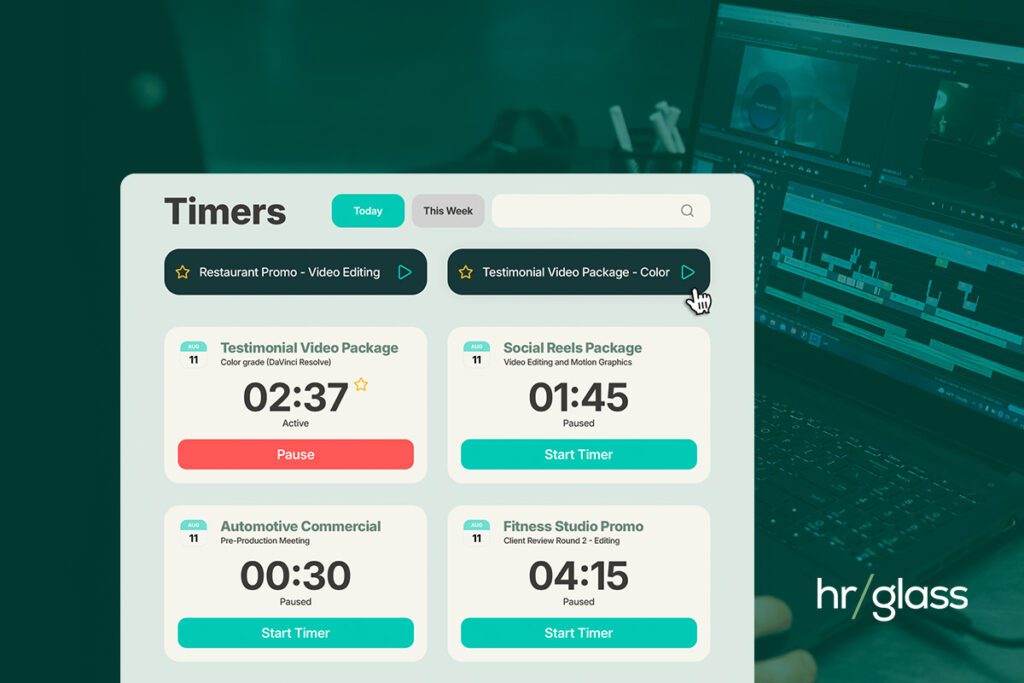
Ask which feature gets used daily, and it’s the timer. Every day, without fail. So the priority was making it as close to frictionless as possible.
In a tool like Harvest, starting a timer means filling out a small form first: pick the client, pick the project, pick the task, set the date, mark it billable or not. Every single time.
Since tasks in hrglass already carry their own billing details, we built Favorite Tasks: star a task once, and it shows up as a one-click quick-start timer. No form. Just click, and the clock’s running.
It probably saves something like 25 seconds each time. That’s it. But it’s the single most-used small feature in the whole platform, because those 25 seconds happen dozens of times a week for people who live in their timer.
On average, hrglass users are logging around 30 hours a week through the Timer alone, which is notable considering flat rate tasks and non-billable work don’t usually get run through a timer at all. That’s how central time tracking still is, even for people using a full project management tool on top of it.
So who is this actually for

The honest answer: someone running a service-based business who started out needing to track hours and get paid, and has now grown past the point where a spreadsheet or a simple time tracker can keep up.
That covers a lot of ground: videographers, photographers, web designers, media professionals, construction subcontractors, consultants, agencies. But narrowing it to a list of industries undersells it. The real pattern is any business where clients expect to see how long something took, where a project actually stands, and a proper invoice, sometimes with a retainer or recurring billing involved.
Somewhere around ten active clients, spreadsheets stop being manageable. It’s not really about the number of rows. It’s what happens when a project goes on hold or a client pushes their timeline back. That project doesn’t disappear, it just sits there, cluttering the sheet, making it harder to see what actually needs attention this week. That’s usually the moment a real project management tool stops being optional.
Pricing, if you’re at that point

Two plans, and both include the full feature set. Nothing is locked behind a higher tier just because you’re paying less. The Team plan adds collaboration tools for working with other people; it doesn’t unlock features that should’ve been included from the start. If you want to see it in action, there’s a 14-day free trial.
The actual answer to the question
There isn’t one tool that’s right for every business, and anyone telling you otherwise is selling something. The right tool is the one that matches where your business actually is right now, handles billing the way your work actually happens, and doesn’t punish you for growing.
If your work mixes flat rate and hourly billing inside the same project, and you want invoicing built in rather than bolted on, hrglass was built by someone who went looking for exactly that and couldn’t find it anywhere else.
Frequently Asked Questions
FAQ: How Do I Choose the Right Project Management Tool for My Business?
Do I actually need a project management tool, or is a spreadsheet still fine?
If you’re managing a couple of clients and the spreadsheet is still working, keep using it. That’s not a problem to fix. The real signal to watch for is usually somewhere around ten or more active clients, especially once projects start going on hold or clients push their timelines. That’s when a spreadsheet stops being organized and starts being clutter.
What’s the actual difference between hrglass and Harvest?
Harvest is a solid time tracker and invoicing tool, and that’s genuinely where this whole thing started too. The gap is everything past that: knowing where a project stands, tracking budgets, setting priorities, seeing what’s actually due soon. hrglass keeps the time tracking and invoicing you’re used to, and adds the project management layer on top, so you’re not running two disconnected tools side by side.
Can I bill some tasks hourly and others flat rate within the same project?
Yes, and this is the whole reason hrglass exists. Every task carries its own billing type, fixed, hourly, non-billable, or a rate multiplier, independent of whatever’s happening elsewhere in the project. A website project can have flat rate design work and hourly maintenance living in the same project without any workarounds.
Is invoicing actually built into hrglass, or do I need to connect a separate app?
It’s built in. You can invoice straight from a project, pull multiple projects or tasks onto a single invoice, and customize the branding to match your business. No Zapier, no third-party invoicing app bolted on.
What do I actually get with the 14-day free trial?
Full access to whatever plan you’re trying, nothing held back behind a future upgrade. Both plans hrglass offers are fully featured from day one, so the trial shows you the real thing, not a limited preview of it.
Who is hrglass actually built for?
Service-based businesses: freelancers, small teams, and agencies who invoice clients for time or deliverables and need that tied to real project tracking. That covers a lot of ground, web designers, videographers, photographers, consultants, construction subcontractors, and plenty of others, but the common thread is billing clients for work and needing more visibility than a spreadsheet or a basic time tracker can give you.